Audi Virtual Cockpit: Customize, Upgrade, and Master Your Digital Dashboard
Learn how to personalize your Audi Virtual Cockpit, understand the difference between Virtual Cockpit and Virtual Cockpit Plus, and get the most from your digital display.
What Is Audi Virtual Cockpit?
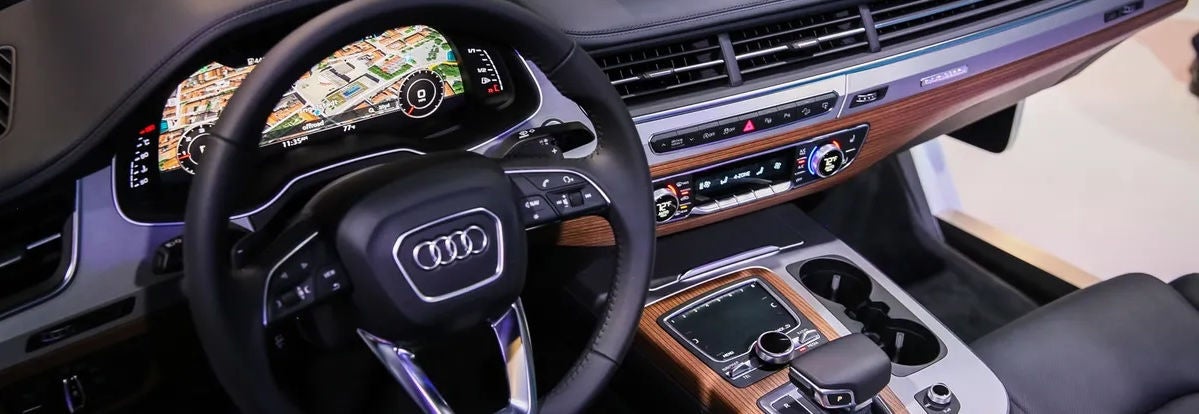
Audi Virtual Cockpit is a fully digital 12.3-inch instrument cluster that replaces traditional analog gauges. Instead of fixed dials, you get a high-resolution display that shows speed, RPM, navigation maps, driver assistance systems, media, and vehicle data directly in your line of sight.
The system allows you to prioritize what matters most, whether that is full-screen navigation, performance data, or classic gauge styling.
Virtual Cockpit vs. Virtual Cockpit Plus
While both systems replace analog gauges with a digital display, there are meaningful differences.
The standard Audi Virtual Cockpit provides multiple viewing modes, including Classic and Infotainment layouts.
Virtual Cockpit Plus enhances the experience with:
- Sharper graphics and smoother animations
- Additional display themes such as Sport and Dynamic
- Expanded customization options
- More immersive transitions between layouts
Drivers of performance-focused models like the S5 or SQ5 often appreciate the sport-inspired graphics available in the Plus version.
How to Customize Your Audi Virtual Cockpit
Customizing your display ensures your most important information is always front and center.
Using the “View” button on the steering wheel, you can toggle between layouts. Through the MMI system, you can choose which data appears, including:
- Navigation maps
- Audio information
- Driver assistance systems
- Performance metrics
Audi also allows user profile settings. Your display layout, seat position, mirror adjustments, and climate preferences can automatically load when you enter the vehicle.
This makes personalization simple, especially if multiple drivers share the same Audi.
Virtual Cockpit in the Audi A5 and Q5
In the Audi A5, Virtual Cockpit provides quick access to navigation, media, and vehicle data with sharp graphics that complement its performance-oriented interior.
In the Audi Q5, the system integrates seamlessly with the multifunction steering wheel, allowing drivers to switch between views without distraction. The layout works especially well for daily commuting and highway driving.
Both models showcase how the system enhances comfort and usability.
How Virtual Cockpit Improves Everyday Driving
Audi Virtual Cockpit is more than a visual upgrade. It improves how you interact with your vehicle.
Navigation directions appear directly in your line of sight. Incoming calls and media changes are displayed clearly. Driver assistance systems can be monitored in real time.
Instead of glancing between multiple screens, everything is accessible from one central digital display. This reduces distraction and improves awareness during traffic, merging, or long drives.
Integration with Audi’s MMI and voice controls makes the experience even smoother.
Can You Upgrade to Virtual Cockpit Plus?
If your Audi includes the standard Virtual Cockpit, upgrading may be possible depending on model year and configuration.
Certain models, including the A5 and Q5, may support retrofit options. Upgrades typically require both hardware and software adjustments.
Because the system is integrated with core vehicle electronics, upgrades should always be performed by factory-trained Audi technicians to ensure proper functionality and warranty protection.
Audi Great Neck can confirm compatibility for your specific vehicle.
Tips for Getting the Most Out of Your Digital Dashboard
To fully maximize your Virtual Cockpit experience:
- Explore all available display modes
- Customize user profiles for each driver
- Keep your vehicle software updated
- Use steering wheel controls to adjust views safely
Taking time to explore these features unlocks capabilities many drivers overlook.
A Smarter Way to Drive
Audi Virtual Cockpit transforms the traditional dashboard into an intelligent interface that adapts to your preferences.
Whether you prefer a minimalist layout or a performance-focused display, the system delivers clarity, customization, and control every time you start the engine.